📘 Promotional Financing is not available by default. Contact your Account Manager to enable this feature for your integration.
Overview
Promotional Financing adds special messaging — such as 0% APR, $0 down, or deferred payments — to your <up-from-pricing> components. When a promotion is active for a given price point, the component automatically displays a promotional badge alongside the monthly pricing.
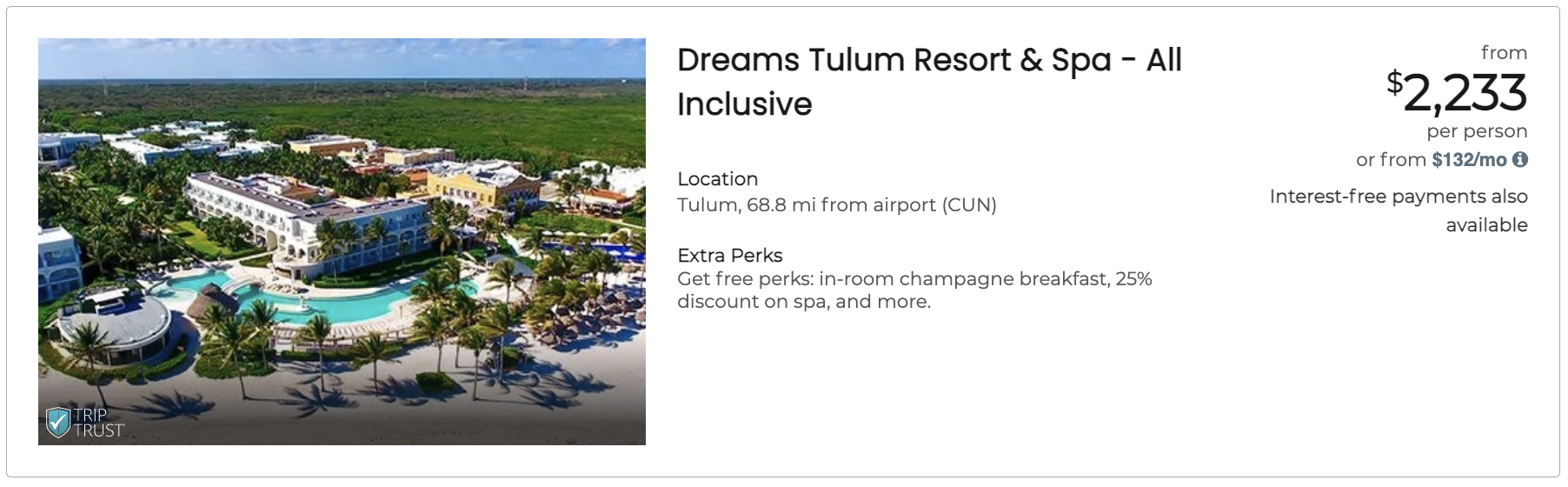
How Promos Work
Promos follow a resolution pipeline:
- The backend returns available promos for each price point in the API response (e.g.,
["zero-percent-guaranteed", "zero-down-guaranteed"]) - The component decides what to display based on your configuration
- Matching promos render as badges with localized text inside the Shadow DOM
Resolution Priority
| Priority | Condition | Behavior |
|---|---|---|
| 1st | promo-disabled="true" is set |
Promo badges are hidden for that component |
| 2nd | promo-disabled is not set (default) |
All promos available from the backend are displayed |
In all cases, the SDK internally injects a zero-down signal when pay_today === 0. This is consumed by the modal and tooltip layers.
Available Promo Codes
Zero Down
| Code | Display Text |
|---|---|
zero-down-guaranteed |
Pay $0 today! |
zero-down-variable |
Pay as little as $0 today! |
Zero Percent (Interest-Free)
| Code | Display Text |
|---|---|
zero-percent-guaranteed |
Enjoy interest-free, monthly payments! |
zero-percent-variable |
Interest-free payments may be available! |
zero-percent-at-least-one |
Interest-free payments may be available! |
Delayed Payments
| Code | Display Text |
|---|---|
3-month-delayed |
No payments for up to 3 months. |
6-month-delayed |
No payments for up to 6 months. |
month-delayed |
No payments for up to N months. (dynamic based on offer) |
Combined (Zero Percent + Delayed)
| Code | Display Text |
|---|---|
zero-percent-3-month-delayed |
Interest-free payments may also be available and no payments for up to 3 months. |
zero-percent-6-month-delayed |
Interest-free payments may also be available and no payments for up to 6 months. |
zero-percent-month-delayed |
Interest-free payments may also be available and no payments for up to N months. |
📘 Promo display text is managed by the SDK and localized automatically. You do not control the badge wording.
Adding Promotional Messaging
Default: Show All Available Promos
By default, the component displays every promo badge the backend returns for this price point:
<up-from-pricing
  price-value="35000"
  price-type="cruise_option"
></up-from-pricing>
Optional: Hide Promo Badges
If you need to suppress promo badges for a specific component, set promo-disabled="true":
<up-from-pricing
  price-value="35000"
  price-type="cruise_option"
  promo-disabled="true"
></up-from-pricing>
Behind the Scenes: Zero-Down Signal
You do not need to act on this — it is handled entirely by the SDK.
When the backend returns an offer where pay_today === 0, the SDK internally injects a zero-down code. The modal and tooltip layers use this signal to display "$0 today" context.
Campaign-Based Promotions
Promotional campaigns are configured on the Flex Pay side by your Account Manager. You send campaign codes in the order schema via window.Uplift.Payments.load(orderInfo), and the backend determines which promos apply to each price point.
See Campaign Targeting for details on sending campaign data.
⚠️ Campaign-based promotional filtering is only supported when price-type is different from total. If price-type="total", campaign filtering does not apply.
Styling Promo Badges
Customize promotional badge appearance using CSS Custom Properties:
up-from-pricing {
  --fp-promo-color: #ffffff;
  --fp-promo-font-size: 12px;
  --fp-promo-font-weight: 400;
  --fp-promo-line-height: 1.4;
}
See From Pricing Configurations for the full list of styling properties.