Overview
Getting started with Flex Pay takes just one script tag. Paste the up.js snippet below on any page where you want BNPL functionality and you are ready to go.
That single snippet gives you:
window.Uplift.Payments— the full PaymentJS runtime<up-from-pricing>— the From Pricing web component, auto-registered and ready to use- Shadow DOM isolation — your CSS will never break Flex Pay rendering, and vice-versa
- Built-in performance optimizations — request batching, deduplication, and caching are handled for you
No npm installs, no build steps, and no extra configuration files to manage.
What You Need
| Item | Where to get it |
|---|---|
Your UP-code (UP-XXXXXXXX-XX) |
Provided by your Flex Pay Account Manager before development |
| The correct environment snippet | Production or Pre-Production (see below) |
You will receive two separate UP-codes — one for testing and one for production. The testing code enables helpful debug messages in the browser console that are suppressed in production.
Add the Snippet
Place the snippet on every page where Flex Pay components will appear. This applies to both payment and non-payment pages.
Production
Replace UP-XXXXXXXX-XX with your production UP-code:
(function (u, p, l, i, f, t, o, b, j) { u['UpLiftPlatformObject'] = f; u[f] = u[f] || function () { (u[f].q = u[f].q || []).push(arguments) }, u[f].l = 1 * new Date(); b = p.createElement(l), j = p.getElementsByTagName(l)[0]; b.async = 1; b.src = i + '?upcode=' + t; j.parentNode.insertBefore(b, j); o = u.location.host.match(/[\w-]+\.\w{2,3}(:\d+)?$/); if (o) o = o[0]; u[f]('create', t, o) })(window, document, 'script', 'https://tag.uplift.com/external/up.js', 'up', 'UP-XXXXXXXX-XX');Pre-Production
Replace UP-XXXXXXXX-XX with your testing UP-code:
(function (u, p, l, i, f, t, o, b, j) { u['UpLiftPlatformObject'] = f; u[f] = u[f] || function () { (u[f].q = u[f].q || []).push(arguments) }, u[f].l = 1 * new Date(); b = p.createElement(l), j = p.getElementsByTagName(l)[0]; b.async = 1; b.src = i + '?upcode=' + t; j.parentNode.insertBefore(b, j); o = u.location.host.match(/[\w-]+\.\w{2,3}(:\d+)?$/); if (o) o = o[0]; u[f]('create', t, o) })(window, document, 'script', 'https://carbon.rc01gw.uplift-platform.com/external/up.js', 'up', 'UP-XXXXXXXX-XX');If up.js fails to load (network error, ad-blocker, etc.), all Flex Pay elements remain hidden by default. Your page will render normally without any broken UI.
What Happens Behind the Scenes
Once the snippet executes:
up.jsloads asynchronously — it will not block your page rendering- The Flex Pay SDK is exposed as
window.Uplift.Payments - The
<up-from-pricing>web component is registered automatically - The SDK calls
window.upReady(which you will define in Step 2)
At this point window.upReady is not yet defined, so you will see UPREADY? undefined in the console. That is expected — Step 2 resolves it.
Ideally, load up.js once per page lifecycle. If you need to reload it (for example, after a full route teardown in an SPA), call these cleanup functions first:
window.Uplift.Payments.clear() window.Uplift.Payments.exit()
Step-by-step Validation Guide (Recommended)
Verify everything works in under 5 minutes:
-
Add the Pre-Production snippet to your page using one of the sample testing UP-codes:
- Travel:
UP-37292414-99 - Retail:
UP-37292414-94
- Travel:
(function (u, p, l, i, f, t, o, b, j) { u['UpLiftPlatformObject'] = f; u[f] = u[f] || function () { (u[f].q = u[f].q || []).push(arguments) }, u[f].l = 1 * new Date(); b = p.createElement(l), j = p.getElementsByTagName(l)[0]; b.async = 1; b.src = i + '?upcode=' + t; j.parentNode.insertBefore(b, j); o = u.location.host.match(/[\w-]+\.\w{2,3}(:\d+)?$/); if (o) o = o[0]; u[f]('create', t, o) })(window, document, 'script', 'https://carbon.rc01gw.uplift-platform.com/external/up.js', 'up', 'UP-37292414-99');-
Open your browser Developer Tools (Console + Network tab).
-
Refresh the page and filter network requests by "Uplift".
-
Confirm these three things:
| What to check | Expected result |
|---|---|
up.js network request |
200 OK |
window.Uplift.Payments |
Available (type it in the console) |
UPREADY? console message |
undefined (expected until Step 2) |
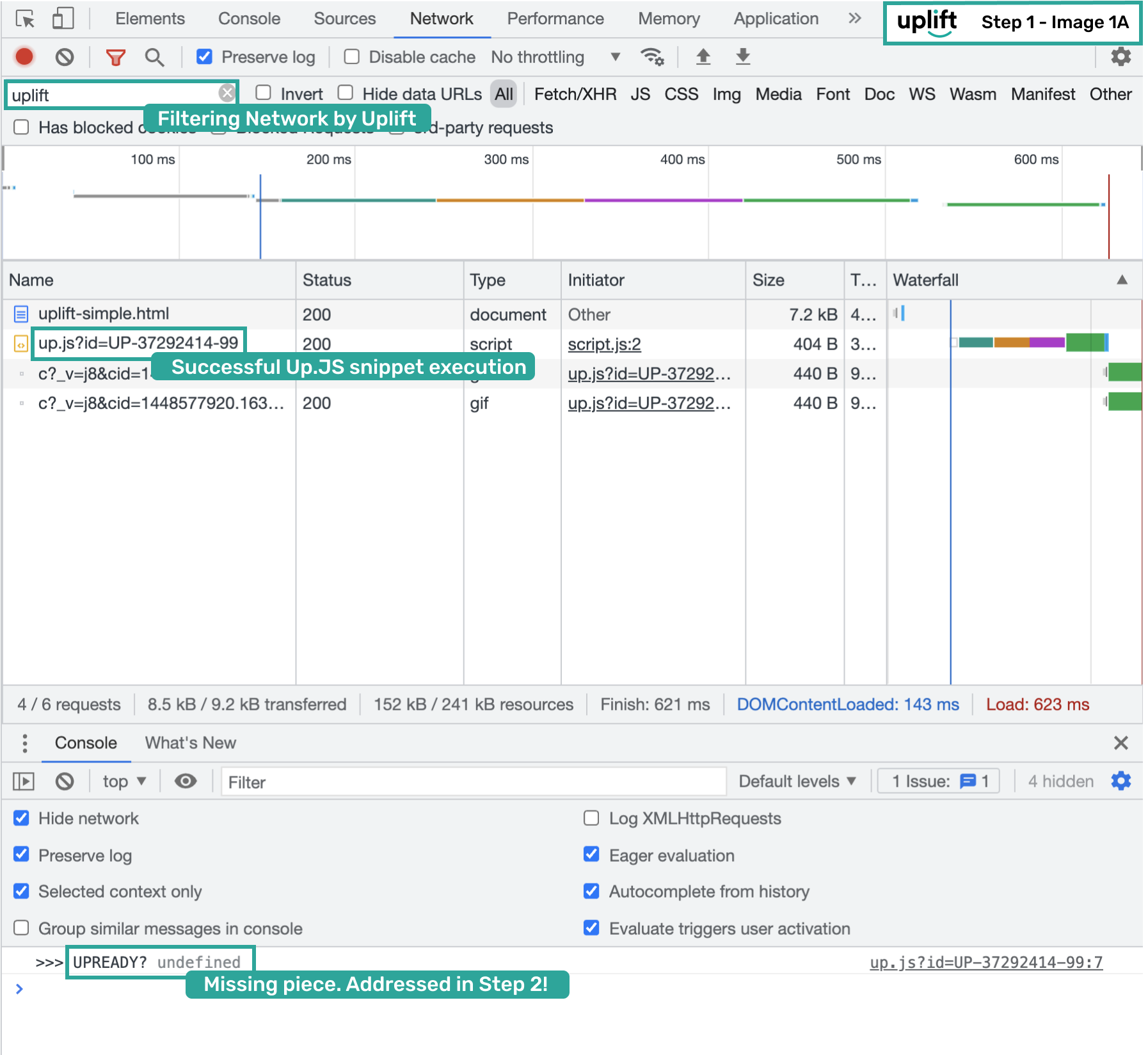
- Type
window.Uplift.Paymentsin the console to confirm the SDK object is loaded:
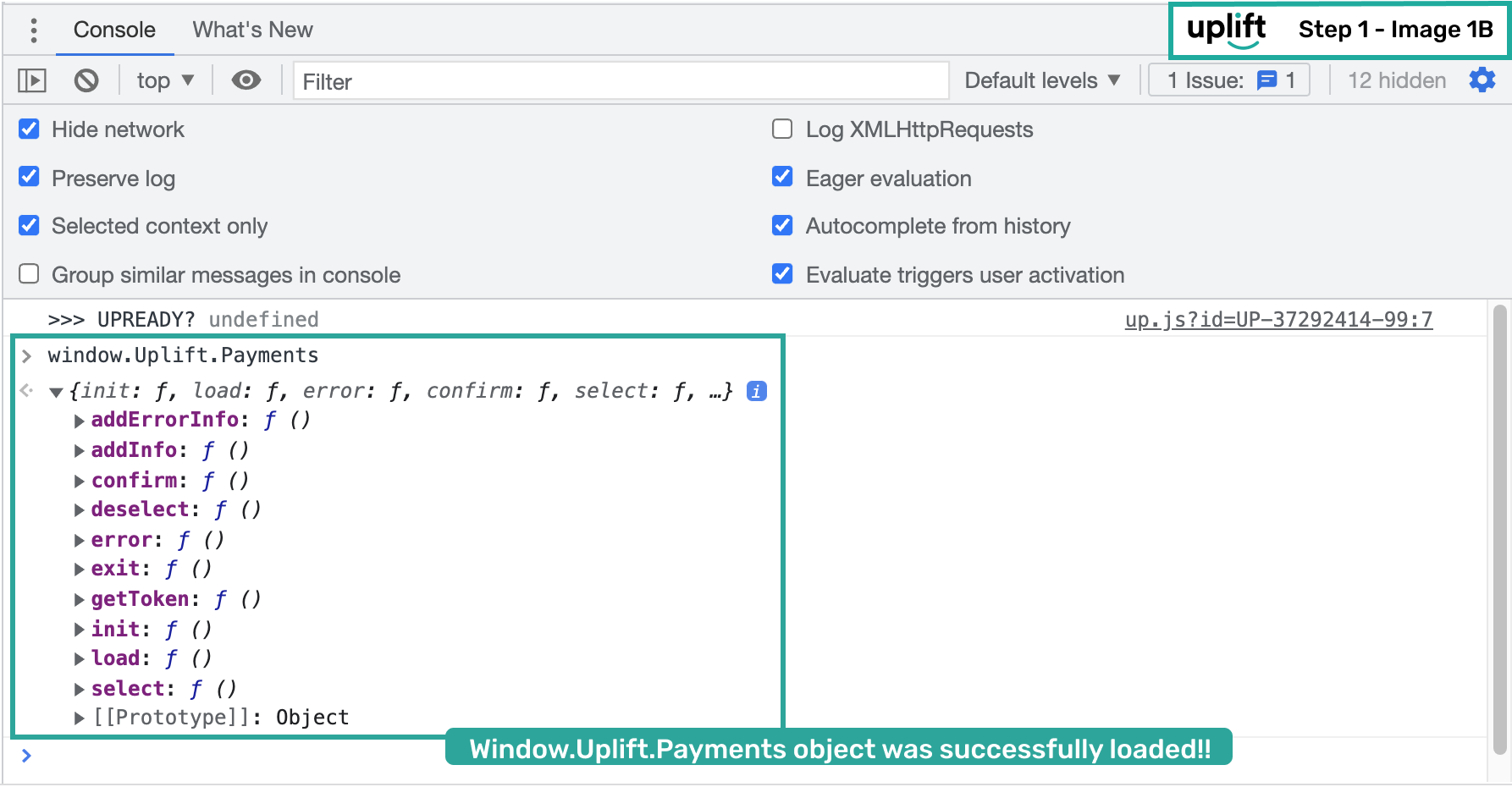
If both checks pass, the SDK is loaded and ready. Continue to Step 2: Initialize Flex Pay Payments to configure locale, currency, and activate the
upReady lifecycle.