Overview
Initialization tells the SDK what language, currency, and page context to use. You configure this once per page and every Flex Pay component — including all <up-from-pricing> instances — inherits the settings automatically.
This step resolves the UPREADY? undefined message you saw in Step 1.
What You Configure vs. What We Handle
| You set | We handle |
|---|---|
locale (e.g. en-US, fr-CA) |
Localized wording and currency formatting across all components |
currency (e.g. USD, CAD) |
Consistent currency display and offer calculations |
checkout (true or false) |
Payment vs. non-payment messaging context |
channel (e.g. desktop) |
Device-appropriate rendering |
container (payment pages only) |
iFrame placement and lifecycle |
onChange (payment pages only) |
Status callback routing |
Once init runs, every <up-from-pricing> component on the page automatically receives locale, currency, branding, and formatting context through the internal bridge. No per-component configuration is needed for these values.
Integration Details
A) Define the Initialization Function
Create an initPayMonthly function with the correct settings for your page type.
⚠️ Replace locale, currency, and channel with values that match your website.
Payment Page
function initPayMonthly() {
  window.Uplift.Payments.init({
    locale: "en-US",       // "en-CA", "fr-CA"
    currency: "USD",       // "CAD"
    checkout: true,
    channel: "desktop",
    container: "#up-pay-monthly-container", // covered in Step 5
    onChange: myOnChangeCallback            // covered in Step 4
  });
}
Non-Payment Page
function initPayMonthly() {
  window.Uplift.Payments.init({
    locale: "en-US",       // "en-CA", "fr-CA"
    currency: "USD",       // "CAD"
    checkout: false,
    channel: "desktop"
  });
}
Initialize on every page that uses any Flex Pay component — From Pricing, Pre-qualification, or Payments. Detailed configuration references are available here.
⚠️ Call window.Uplift.Payments.init() only once per page. Multiple calls will cause unexpected behavior.
B) Wire It Into the SDK Lifecycle
The SDK automatically calls window.upReady when up.js finishes loading. Define it and call initPayMonthly inside:
window.upReady = function() {
    initPayMonthly();
}
You only define window.upReady — never call it yourself. The SDK handles the timing.
📘 We will add more logic to window.upReady in the next steps (order loading, callbacks). See Step 3 for the complete function.
How This Powers From Pricing
When init executes, the SDK sends a ready event through the internal bridge with your configuration. Every <up-from-pricing> component on the page receives:
- locale — for localized wording (e.g. "or from" vs. "ou à partir de")
- currency — for correct symbol, delimiter, and formatting
- branding — for consistent Flex Pay identity across placements
This means you set locale and currency once in init, and all pricing components render correctly without per-element configuration.
Step-by-step Validation Guide (Recommended)
Continuing from Step 1, let's confirm initialization works on a non-payment page:
- Define
window.upReadywith a console log so you can confirm it fires:
window.upReady = function() {
    window.console.log("up.js is calling upReady!");
    initPayMonthly();
}
- Define the
initPayMonthlyfunction:
function initPayMonthly() {
  window.console.log("Initializing Uplift Payments...");
  window.Uplift.Payments.init({
    locale: "en-US",
    currency: "USD",
    checkout: false,
    channel: "desktop"
  });
}
- Refresh the page and check the console:
| What to check | Expected result |
|---|---|
UPREADY? |
true |
init log |
Key-value pairs showing your configuration |
| Errors | None |
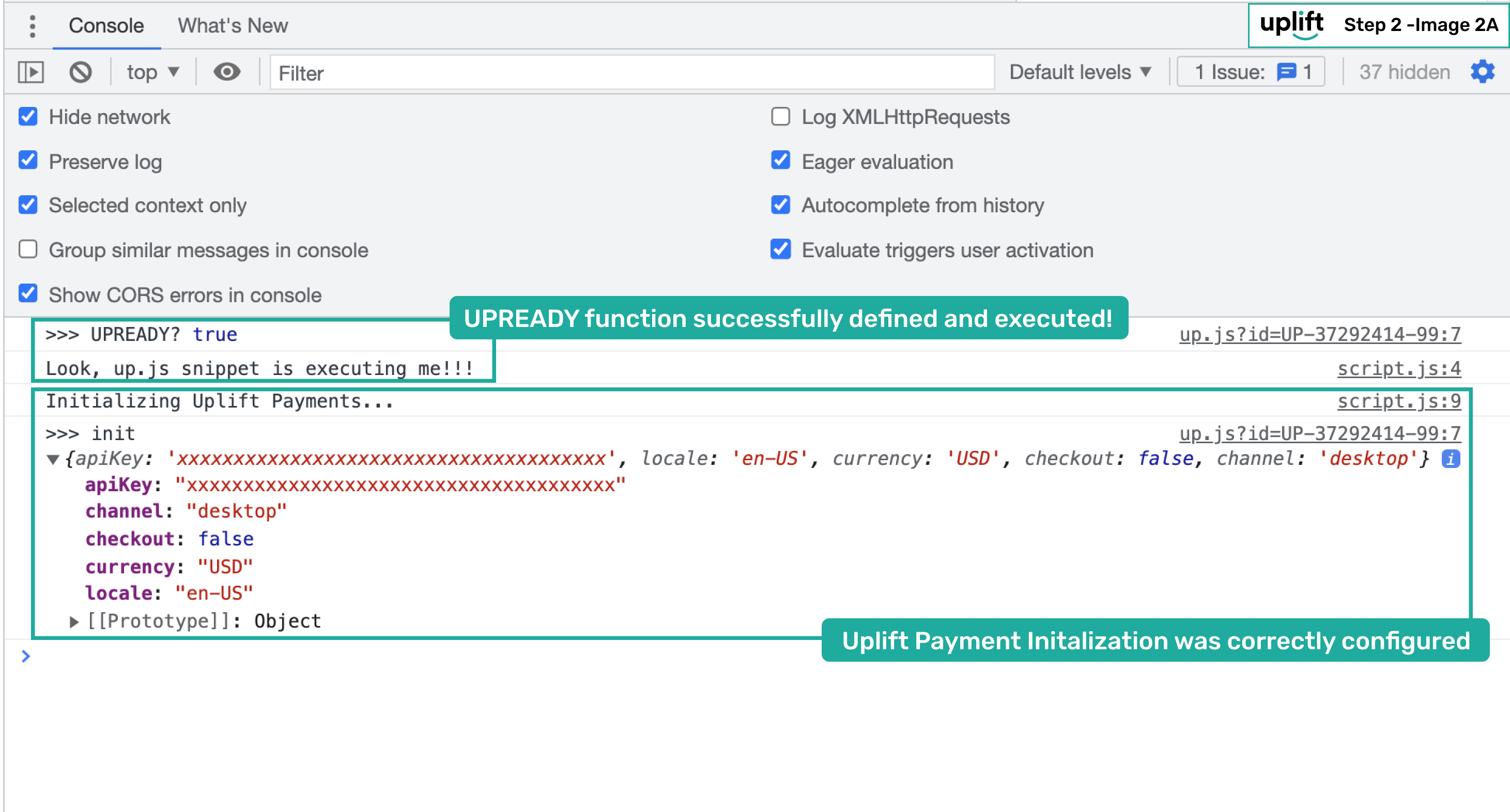
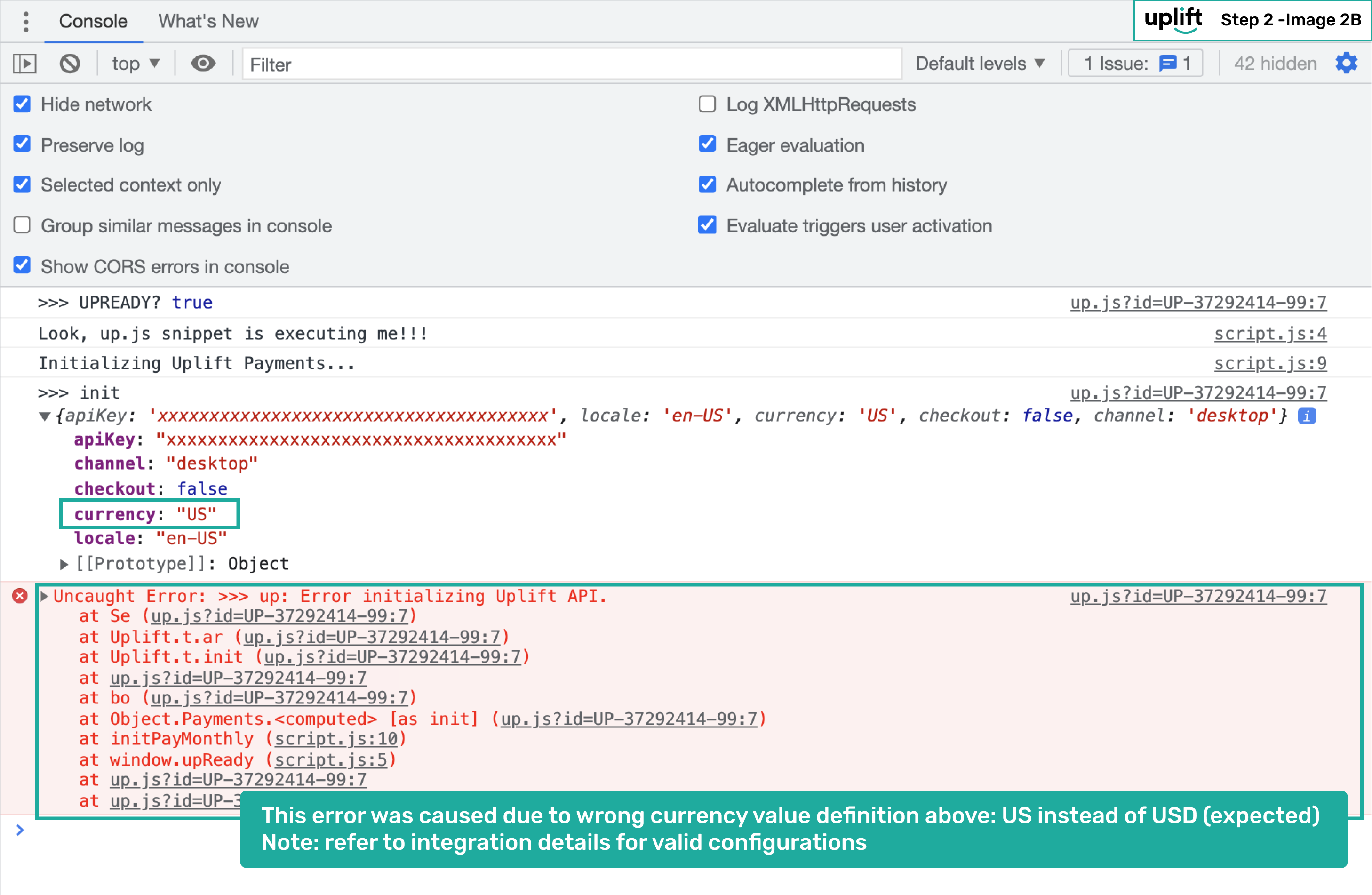
- If initialization fails (missing values, wrong format), you will see an error in the console:
Once you see UPREADY? true and the init configuration logged without errors, continue to Step 3: Send Order Details to start receiving pricing offers.