Overview
This is where your integration comes alive. You build an OrderInfo object with order details, call window.Uplift.Payments.load(orderInfo) once, and every <up-from-pricing> component on the page updates with the right offer automatically.
You focus on providing accurate order data. We handle the rest — batching API requests, distributing offers to components, and managing cache.
What You Configure vs. What We Handle
You do | We handle |
|---|---|
Build the | Batch pricing requests for all visible components |
Call | Distribute offers to each |
Keep | Cache management and request deduplication |
Integration Details
Define a function that returns an OrderInfo object with details relevant to your business vertical.
Use the data schema that matches your industry.
function buildOrderInfo() {
  return {
 travelers: [
      {
        "id": 0,
        "first_name": "Arthur",
        "last_name": "Davis",
        "date_of_birth": "04/07/1963"
      }
    ],
 air_reservations: [
      {
        "airline_name": "AI",
        "origin": "MIA",
        "destination": "JFK",
        "trip_type": "oneway",
        "itinerary": [
          {
            "departure_apc": "MIA",
            "departure_time": "20271223",
            "arrival_apc": "JFK",
            "arrival_time": "20271224",
            "fare_class": "Economy",
            "carrier_code": "NF"
          }
        ],
        "insurance": [
          {
            "id": "0",
            "types": ["cancellation"],
            "price": 10000
          }
        ]
      }
    ],
 add_ons: [
      {
        "id": "0",
        "name": "Priority Boarding",
        "price": 5000
      }
    ],
 order_amount: 99900 //equivalent to $999.00 ⚠️ always use cents(integer)
  }
}
function buildOrderInfo() {
  return {
 travelers: [
      {
        "id": 0,
        "first_name": "Arthur",
        "last_name": "Davis",
        "date_of_birth": "04/07/1963"
      }
    ],
 hotel_reservations: [
      {
        "hotel_name": "Snooze Inn",
        "reservation_type": "pre_paid",
        "has_deposit": false,
        "number_of_rooms": 1,
        "room_type": "deluxe suite",
        "check_in": "20271224",
        "check_out": "20271225",
        "insurance": [
          {
            "id": "0",
            "types": ["cancellation"],
            "price": 10000
          }
        ]
      }
    ],
 add_ons: [
      {
        "id": "0",
        "name": "Early Check-in",
        "price": 5000
      }
    ],
 order_amount: 99900 //equivalent to $999.00 ⚠️ always use cents(integer)
  }
}
function buildOrderInfo() {
  return {
 travelers: [
      {
        "id": 0,
        "first_name": "Arthur",
        "last_name": "Davis",
        "date_of_birth": "04/07/1963"
      }
    ],
 cruise_reservations: [
      {
        "cruise_line": "Wavy Cruise Lines",
        "ship_code": "WAV",
        "embark_date": "20271205",
        "disembark_date": "20271201",
        "cruise_duration": 4,
        "itinerary": [
          {
            "departure_port": "MIA",
            "departure_date": "20271201",
            "arrival_port": "FPO",
            "arrival_date": "20271203"
          }
        ],
        "rooms": [
          {
            "cabin_type": "Balcony",
            "state_room_type": "Junior Suite"
          }
        ],
        "insurance": [
          {
            "id": "0",
            "types": ["cancellation"],
            "price": 10000
          }
        ]
      }
    ],
 add_ons: [
      {
        "id": "0",
        "name": "Internet Access",
        "price": 5000
      }
    ],
 order_amount: 99900 //equivalent to $999.00 ⚠️ always use cents(integer)
  }
}
function buildOrderInfo() {
  return {
 billing_contact: {
      "first_name": "Arthur",
      "last_name": "Davis",
      "date_of_birth": "04/07/1963",
      "street_address": "1013 Weda Cir",
      "city": "Mayfield",
      "region": "KY",
      "postal_code": "99999",
      "phone": "5555554206",
      "email": "arthur@uplift.com"
    },
 shipping_contact: {
      "first_name": "Emily",
      "last_name": "Davis",
      "date_of_birth": "02/07/1963",
      "street_address": "1013 ABC Street",
      "city": "Mayfield",
      "region": "KY",
      "postal_code": "42066",
      "phone": "5555554206",
      "email": "arthur@uplift.com"
    },
 order_lines: [
      {
        "name": "Electric Guitar",
        "sku": "1254865",
        "unit_price": 99900,
        "quantity": 1
      }
    ],
 order_amount: 99900 //equivalent to $999.00 ⚠️ always use cents(integer)
  }
}
function buildOrderInfo() {
  return {
 travelers: [
      {
        "id": 0,
        "first_name": "Arthur",
        "last_name": "Davis",
        "date_of_birth": "04/07/1963"
      }
    ],
 event_tickets: [
      {
        "event_name": "Mayfield's Annual Music Festival",
        "venue_name": "Events Park",
        "unit_price": 84900,
        "quantity": 1,
        "start_date": "20271201",
        "end_date": "20271202",
        "insurance": [
          {
            "id": "0",
            "types": ["cancellation"],
            "price": 10000
          }
        ]
      }
    ],
 add_ons: [
      {
        "id": "0",
        "name": "Meet and Greet Experience",
        "price": 5000
      }
    ],
 order_amount: 99900 //equivalent to $999.00 ⚠️ always use cents(integer)
  }
}
function buildOrderInfo() {
  return {
 travelers: [
      {
        "id": 0,
        "first_name": "Arthur",
        "last_name": "Davis",
        "date_of_birth": "04/07/1963"
      }
    ],
 rentals: [
      {
        "agency": "Car Rentals of Mayfield",
        "type": "2021 Toyota Camry",
        "unit_price": 84900,
        "quantity": 1,
        "start_date": "20271205",
        "end_date": "20271206",
        "pickup_location": {
          "street_address": "1452 Rental Ave",
          "city": "Mayfield",
          "region": "KY",
          "country": "US",
          "postal_code": "99999"
        },
        "dropoff_location": {
          "street_address": "1452 Rental Ave",
          "city": "Mayfield",
          "region": "KY",
          "country": "US",
          "postal_code": "99999"
        },
        "insurance": [
          {
            "id": "0",
            "types": ["cancellation"],
            "price": 10000
          }
        ]
      }
    ],
 add_ons: [
      {
        "id": "0",
        "name": "Child Safety Seat",
        "price": 5000
      }
    ],
 order_amount: 99900 //equivalent to $999.00 ⚠️ always use cents(integer)
  }
}
function buildOrderInfo() {
  return {
 travelers: [
      {
        "id": 0,
        "first_name": "Arthur",
        "last_name": "Davis",
        "date_of_birth": "04/07/1963"
      }
    ],
 passes_subscription: [
      {
        "purchase_site": "www.uplift.com",
        "name": "Uplift Music",
        "type": "annual",
        "renew": true,
        "upgraded": false,
        "unit_price": 99400,
        "quantity": 1,
        "expire_date": "20280907",
        "active_date": "20270907",
        "renew_date": "20280907",
        "recipients": [
          {
            "id": "0",
            "first_name": "Arthur",
            "last_name": "Davis",
            "date_of_birth": "04/07/1963"
          }
        ]
      }
    ],
 add_ons: [
      {
        "id": "0",
        "name": "Extra Device",
        "price": 500
      }
    ],
 order_amount: 99900 //equivalent to $999.00 ⚠️ always use cents(integer)
  }
}
📘 Order amounts must always be in cents (integer). Example: $999.00 = 99900.
📘 Refer to the full Order Object schema for all business verticals here to learn about each attribute and ensure all mandatory fields are populated. For non-payment pages, leave unavailable attributes empty. For payment pages, all mandatory attributes must be populated.
1. Load Initial Offers
After defining buildOrderInfo, add it to window.upReady so offers appear as soon as the page loads:
window.upReady = function() {
  initPayMonthly();

  var orderInfo = buildOrderInfo();
  window.Uplift.Payments.load(orderInfo);
}
⚠️ Call load(orderInfo) inside window.upReady for initial page load, and call it again whenever the user navigates to a new route or order details change.
2. Update Offers on Order Changes
When order data changes (new dates, different travelers, updated cart), rebuild the OrderInfo and call load again. One call updates every pricing component on the page:
var orderInfo = buildOrderInfo();
window.Uplift.Payments.load(orderInfo);
⚠️ A single load(orderInfo) call refreshes all <up-from-pricing> components and Pay Monthly selectors on the page. Before calling load, make sure orderInfo.order_amount and any related values reflect the customer's current selection.
⚠️ Steps 4-6 are exclusive to payment pages. If you are working on a non-payment page, proceed to the Enable User Interface Section to configure From Pricing components.
How From Pricing Components Respond to load()
When you call window.Uplift.Payments.load(orderInfo):
PaymentJS sends the order context to the internal bridge
The orchestrator collects all visible
<up-from-pricing>componentsPricing requests are batched into efficient API calls
Offer responses are distributed to each component automatically
Components re-render with updated monthly pricing inside their Shadow DOM
You do not need to query the DOM, update individual nodes, or manage show/hide logic. The components handle their own visibility based on offer availability.
Step-by-step Validation Guide (Recommended)
Define a
buildOrderInfofunction with sample order data:function buildOrderInfo() {
return {
order_amount: 99900, //equivalent to $999.00 ⚠️ always use cents(integer)
travelers: [
{
id: 0,
first_name: 'Arthur',
last_name: 'Davis'
}
],
air_reservations: [
{
trip_type: 'roundtrip',
itinerary: [
{
departure_apc: 'JFK',
arrival_apc: 'CUN',
departure_time: '20270618'
},
{
departure_apc: 'CUN',
arrival_apc: 'JFK',
departure_time: '20270624'
}
]
}
]
}
}
📘 Refer to the full Order Object schema for all verticals.
Update
window.upReadyfrom Step 2:window.upReady = function() {
console.log("Look, up.js snippet is executing me!!!");
initPayMonthly(); //Initialize Uplift.Payments
var orderInfo = buildOrderInfo(); //Build orderInfo Object
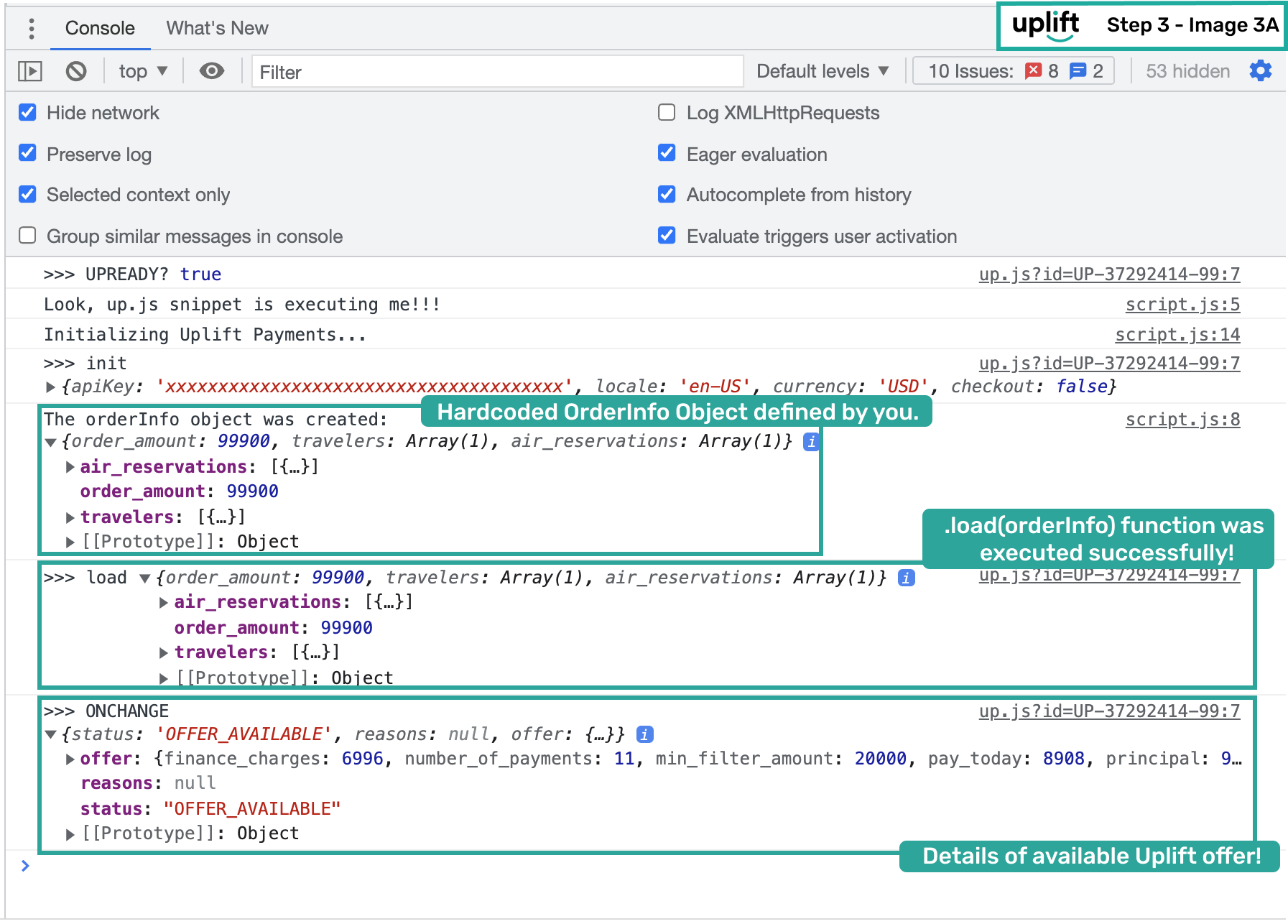
console.log("The orderInfo object was created: ", orderInfo);
window.Uplift.Payments.load(orderInfo); //Load Pay Monthly Offers
}Refresh the page and check the console:
What to check
Expected result
OrderInfologgedShows correct order details
load(orderInfo)executedNo errors
Response status
OFFER_AVAILABLE(for qualifying amounts)
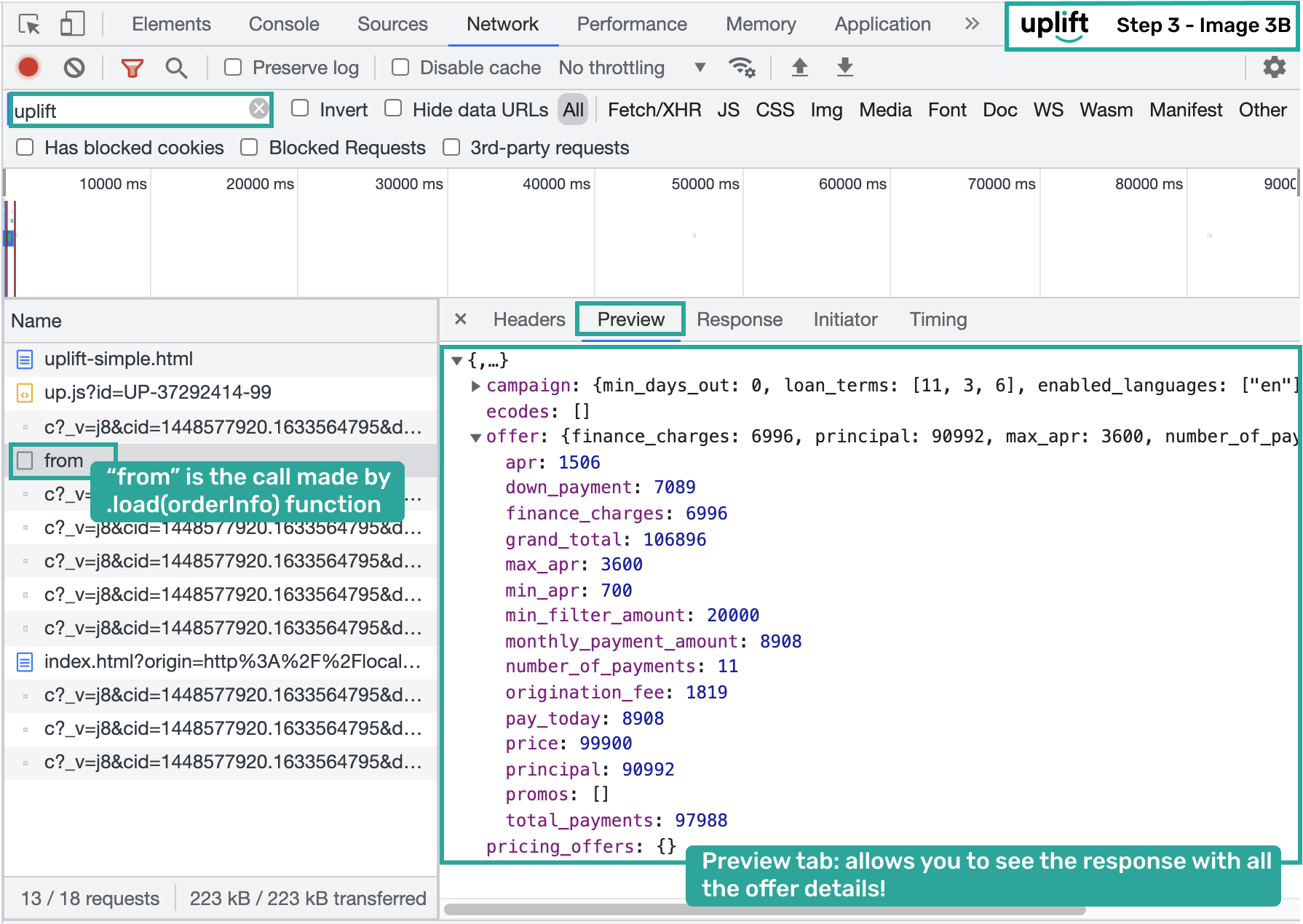
Inspect offer details in the Network tab for campaign-specific pricing information:
At this point, the SDK is loading, initialized, and serving offers. For non-payment pages, continue to the Enable User Interface Section to configure <up-from-pricing> placements. For payment pages, continue to Step 4: Define Callback Handler.