Integration Details
A) Configuring Flex Pay Payments Initialization
Initializing Flex Pay Payments allows you to define the locale (geography and language), currency, security and functional configurations using window.Uplift.Payments.init(initConfig).
This method takes one parameter in the form of key-value pairs. Depending on the type of page you’re working on, define an initPayMonthly method as shown below.
The locale, currency, and channel values should be replaced as per website requirements.
Payment Page
function initPayMonthly() {
  window.Uplift.Payments.init({
    // REPLACE: locale, currency, and channel values should be replaced
    locale: "en-US", // "en-CA", "fr-CA"
    currency: "USD", // "CAD"
    checkout: true,
    channel: "desktop",
    container: "#up-pay-monthly-container", //it will be covered later
    onChange: myOnChangeCallback            //it will be covered later
  });
}
Non-Payment Page
function initPayMonthly() {
  // REPLACE: locale, currency, and channel values should be replaced
  window.Uplift.Payments.init({
    locale: "en-US", // "en-CA", "fr-CA"
    currency: "USD", // "CAD"
    checkout: false,
    channel: "desktop"
  });
}
It is best practice to initialize the library on every page with the corresponding configurations (payment or non-payment page) to ensure the availability of the Flex Pay library. This is required for any page using Flex Pay components including From Pricing, Pre-qualification, and Payments. Detailed information about the key configurations can be found here.
⚠️ The Flex Pay Payments Initialization should be executed ONLY ONCE per page. Avoid making multiple calls of window.Uplift.Payments.init(initConfig).
B) Execute Integration Logic
The Flex Pay library will automatically execute the integration logic defined within the method window.upReady when the Payments library (up.js) is loaded in the browser.Thus this is where we will include a call to our initPayMonthly method defined above.
Note you only have to define the window.upReady function but never execute (call) it yourself.
window.upReady = function() {
    initPayMonthly(); //Initialize Uplift.Payments
}
📘 Note that we will add more elements to this function in the following steps. Refer to Step 3 to see the complete function.
Step-by-step Validation Guide (Recommended)
Previously, in Step 1 validation, we saw an
UPREADY? undefined in the console. This was because when up.js code is loaded, it makes a callback to a predefined method window.upReady to execute the integration code.
Within this guided example for a non-payment page, let’s define this method and validate that Uplift Payments initialization is successful.
- Define the
window.upReadyfunction as shown below. Note we will add more elements to this function in the following steps, for now we will just define the function. - Define the
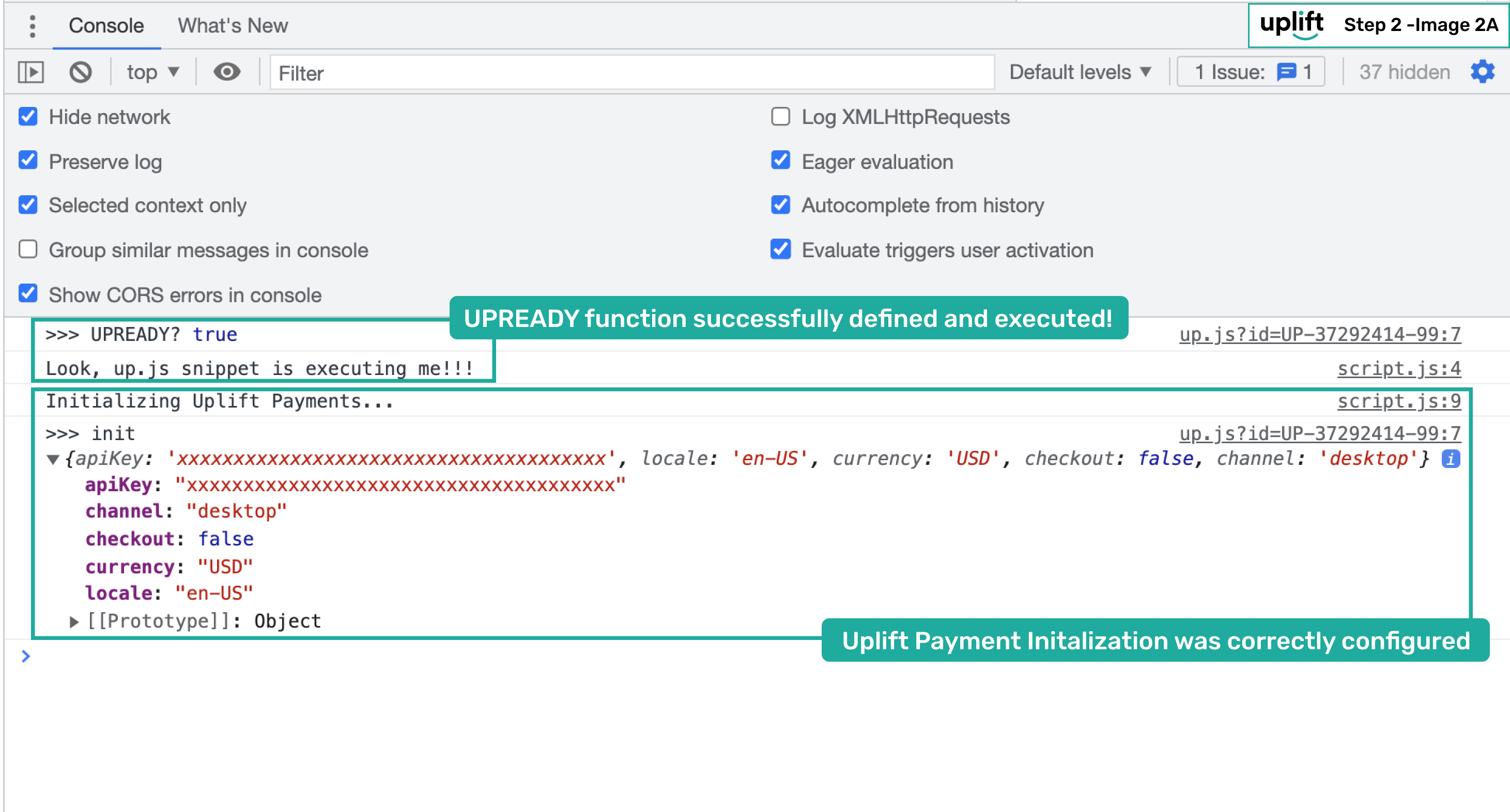
initPayMonthlymethod to initialize the Uplift Payments library as shown below. Note we will add more elements to this function in the following steps, for now we will just define the function. - Then refresh the page, you should validate the following in your browser’s developer tools (console and network tab) as shown in the image below.
UPREADY? truesignifying that you have defined thewindow.upReadymethod and its being called on loading the up.js code.initfollowed by key-value pairs showcasing the initialization configuration.
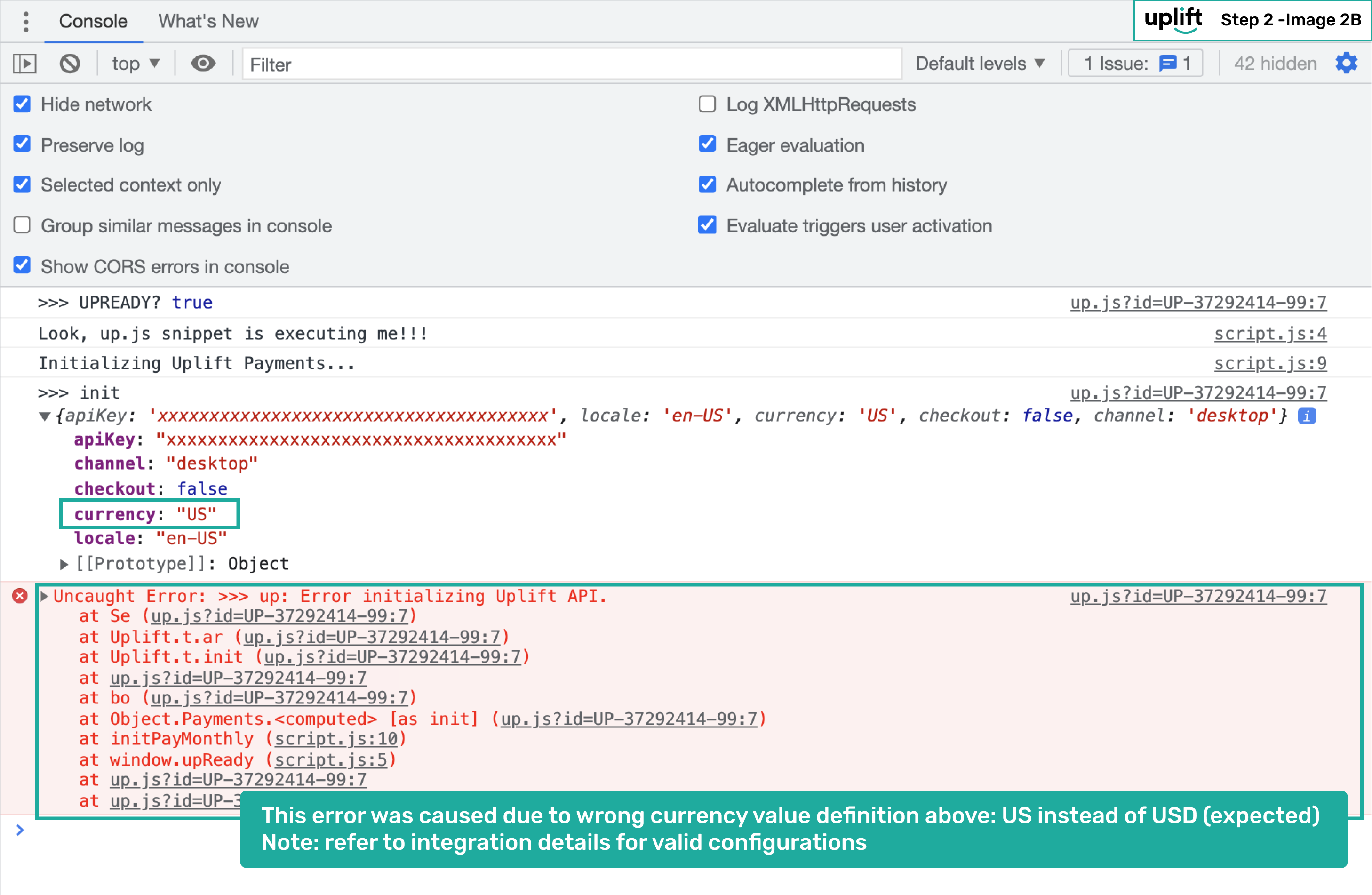
- In case of an error during the Uplift Payments initialization (either due to missing key-value or wrong definition), the error will show up in your developer tools similar to the image shown below.
window.upReady = function() {
    window.console.log("Look, up.js snippet is executing me!!!");
    initPayMonthly(); //Initialize Uplift.Payments
}
  function initPayMonthly() {
  window.console.log("Initializing Uplift Payments...");
  window.Uplift.Payments.init({
    locale: "en-US",
    currency: "USD",
    checkout: false,
    channel: "desktop"
  });
}